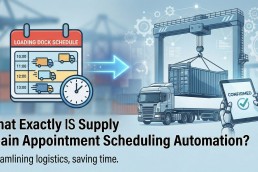
Carrier appointment scheduling automation is software that books, confirms and reschedules dock appointments for a carrier or broker across every channel a facility uses, whether that is a scheduling portal or an email inbox. BiggerPicture does this from one workspace: its Bookr engine sends each stop through the right portal or email based on rules the carrier sets, and routes only the exceptions to a person.
Most carrier ops teams still schedule one load at a time. Someone logs in to a portal, retypes the PO and BOL, hunts for an open slot, then switches to email for the next facility and waits for a reply. This post explains what automation actually does at each step, how it handles portals and email differently, and what a team should expect to still touch by hand.
Definition: carrier appointment scheduling automation. Software that takes a tendered load, decides how each stop should be scheduled (portal or email, which template, which time window, which order), submits the request, captures the confirmation or counter-offer, and writes the result back to a single appointment record. Work it cannot finish becomes a visible exception with a reason attached.
How does carrier appointment scheduling automation work?
On BiggerPicture, automation runs on two layers of rules inside Bookr, the scheduling engine.
- Stop-level rules define how one stop gets sent: the channel (a specific portal, email, or bulk email), the email template, the recipients, and the time variance the carrier will accept.
- Orchestration rules define how a multi-stop load is sequenced: pickup first, delivery first, or both in parallel.
When a load arrives, Bookr applies those rules, submits each request through the right channel, and records the outcome on the appointment. Appointments that follow the carrier’s rules get secured without anyone touching them. Everything else lands in a single exception queue with the reason attached, so the team rebooks with context instead of starting over.
Every appointment, regardless of channel, lives in one Appointments table. That table is the system of record, so a load scheduled through a portal and a load scheduled by email look and behave the same once they are booked.
How does automation schedule through portals?
Portals are structured, but every one is different. BiggerPicture schedules into portals including OpenDock, DataDocks, Retail Link, OneNetwork, FourKites, E2open, Costco, C&S/C3 and Blue Yonder, with 30+ live integrations across portals and platforms.
The difference that matters is that the scheduling flow knows what each portal requires. Retail Link asks for fields like Business Unit, Node and Delivery Type, so those fields appear when the channel is Retail Link. When a portal exposes its availability, as OneNetwork does, open-slot counts per day and the customer’s allowed time tolerance appear right in the schedule and reschedule views. The carrier proposes a time the customer system will actually accept, rather than guessing.
Credentials for each portal are owned by Teams inside BiggerPicture. When an appointment is booked, the activity log records who sent it, through which channel, with which credential. That gives a full audit trail without sharing passwords across a floor.
How does automation schedule by email?
A large share of facilities still schedule by email, and that is where most manual effort hides. BiggerPicture sends scheduling emails in the carrier’s own brand, with the carrier’s logo and signature. The facility recipient gets one-click buttons: a single Confirm button for a proposed time, or an Available Times row with several options. One click moves the appointment to Confirmed, and both sides see the update. No reply to parse, no thread to chase.
For high-volume customer and facility pairs, Bulk Email groups loads by facility into one templated message with an order details table. Bookr can run Bulk Email as an automated method, so a busy lane gets a rolling daily batch with no ops touch. The same bulk request can also be sent manually when a planner wants availability for ten loads at once.
Portal vs email scheduling: what automation handles
| Step | Portal channel | Email channel |
|---|---|---|
| Request | Submitted with the portal’s required fields | Branded templated email, single or bulk |
| Availability | Open slots and tolerance window shown when the portal exposes them | Facility picks from Available Times buttons |
| Confirmation | Captured from the portal and written to the appointment | One click by the facility moves it to Confirmed |
| Counter-offer | Surfaces as an exception for review | Proposed Time Requires Review exception |
| No response | Appointment Expired exception | Email Unanswered 24h and 48h exceptions |
| Audit | Team, user and credential logged | Sender and template logged |
What happens when automation can’t book an appointment?
No automation lands every appointment. The question is whether failures are visible. BiggerPicture’s Exception Management page is the worklist for everything automation did not land or the facility flagged, including:
- Bookr Automation Unsuccessful: the rule ran but the booking did not complete.
- Appointment Expired: the requested window passed without confirmation.
- Proposed Time Requires Review: the facility countered with a different time.
- Email Unanswered [24h] / [48h]: the facility has not replied.
Counter-offers also trigger an email notification based on the carrier’s preferences, so they do not sit unread in a shared inbox. Teams can bulk-select and resolve exceptions in batches. Reschedules are handled separately from new bookings and require a reason, which keeps the audit clean when a customer asks why a time moved.
How do you measure whether it works?
The useful metric is the share of appointment requests that end in a secured appointment. Across the BiggerPicture freight appointment network, the scheduling success rate is 95%, measured over 80,000+ appointments a month at 45,000+ verified facilities. Inside your own team, the signal to watch is where labor goes: scheduling time should shift from per-load data entry to exception triage.
Because many facilities already schedule on BiggerPicture, carriers can often go live in days rather than building a new integration per customer. Echo Global Logistics, for example, moved its appointment scheduling onto the network, and its team walks through that move in a short video on the Carriers page.
Checklist: what to require from a scheduling automation tool
- One workspace for every channel, portal and email, with one appointment record per stop
- Rules you control at the stop level and the multi-stop level
- Portal-specific fields and live portal availability where the portal provides it
- One-click confirmation for facilities that schedule by email
- An exception queue with a reason on every failure
- Per-team credentials and a full audit log
- Outbound email in your brand, not the vendor’s
- Security attestation such as SOC 2
See how this works on the BiggerPicture for Carriers page, learn what a freight appointment network is, or read our primer What exactly is appointment scheduling automation?
Want to see a live appointment secured in 30 minutes? Book a demo with BiggerPicture.
FAQ
What is carrier appointment scheduling automation?
It is software that books, confirms and reschedules dock appointments for carriers and brokers across portals and email, then flags anything it cannot complete. BiggerPicture does this through its Bookr engine in one workspace.
Which scheduling portals does BiggerPicture support?
BiggerPicture has 30+ live integrations, including OpenDock, DataDocks, Retail Link, OneNetwork, FourKites, E2open, Costco, C&S/C3 and Blue Yonder, plus email and bulk email.
Can automation handle facilities that only schedule by email?
Yes. BiggerPicture sends branded scheduling emails with one-click Confirm or Available Times buttons, and Bulk Email can batch loads for the same facility into one message.
What happens when a facility proposes a different time?
The appointment surfaces on the Exception Management page as Proposed Time Requires Review, and the carrier gets an email notification based on its preferences.
What is BiggerPicture’s scheduling success rate?
The scheduling success rate across the BiggerPicture network is 95%, across 80,000+ monthly appointments at 45,000+ verified facilities.
Is BiggerPicture secure?
BiggerPicture is SOC 2 Type I. Portal credentials are held by Teams, and every booking is logged with the user, channel and credential used.